日期返回给前端显示不理想问题
重现
不作配置返回的Date类型如下,格式不令人满意,时间也少了8个小时
1
| {"Date": "2019-11-17T11:39:15.000+0000"}
|
原因
没有对jackson进行时间格式配置
解决
在application.properties中加入对jackson的时区和Date类型格式化配置:
1
2
| spring.jackson.time-zone=GMT+8
spring.jackson.date-format=yyyy-MM-dd HH:mm:ss
|
结果
1
| {"Date": "2019-11-17 19:39:15"}
|
MyBatis-Plus数据库字段未找到问题
重现
运行就抛出org.springframework.jdbc.BadSqlGrammarException:Error querying database. Cause: java.sql.SQLSyntaxErrorException: Unknown column 'user_name' in 'field list'异常,实体类如下:
1
2
3
4
5
6
7
| public class User implements Serializable {
@TableId
private Long id;
private String userName;
}
|
原因
MyBatis-Plus会自动将驼峰命名映射成含下划线的命名,如:userName会被转换成user_name,所以禁用这个即可。
解决
在application.properties中关闭映射即可:
1
| mybatis-plus.configuration.map-underscore-to-camel-case=false
|
Long型雪花主键返回给前端精度丢失问题
重现
原本为1194942865416077314的雪花主键id返回给前端变成了:
1
| { "id": 1194942865416077300}
|
原因
在Long长度大于17位时会出现精度丢失的问题(具体原因有待了解)
解决
在实体类上的雪花id加上注解@JsonSerialize(using=ToStringSerializer.class),将长整数转换成字符串输出处理,如:
1
2
3
4
5
| public class User implements Serializable {
@TableId
@JsonSerialize(using = ToStringSerializer.class)
private Long id;
}
|
结果
1
| {"id": "1194942865416077314"}
|
Maven依赖下载过慢
原因
第一次初始化SpringBoot的时候依赖总是下到一半就卡住,因为国外网站真的是太慢了8!🌚
解决
换成阿里源即可,在~/.m2/settings.xml文件内写入以下内容(~代表用户目录,Windows则是在C:\Users\用户名\.m2\setting.xml,如果不存在,则新建):
1
2
3
4
5
6
7
8
9
10
11
12
13
| <settings xmlns="http://maven.apache.org/SETTINGS/1.0.0"
xmlns:xsi="http://www.w3.org/2001/XMLSchema-instance"
xsi:schemaLocation="http://maven.apache.org/SETTINGS/1.0.0
https://maven.apache.org/xsd/settings-1.0.0.xsd">
<mirrors>
<mirror>
<id>alimaven</id>
<name>aliyun maven</name>
<url>http://maven.aliyun.com/nexus/content/groups/public/</url>
<mirrorOf>central</mirrorOf>
</mirror>
</mirrors>
</settings>
|
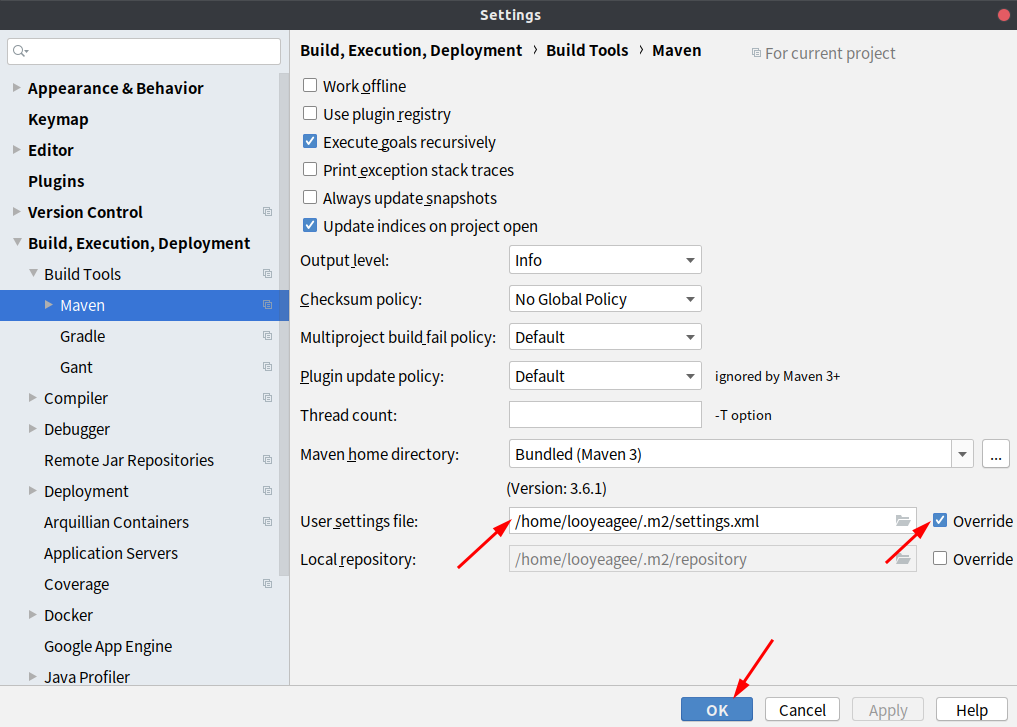
然后在IDEA进行如下配置即可
![图1:IDEA Maven配置]()
实体对象某字段为空值返回给前端显示为null问题
重现
假如返回的实体对象的secret字段是null,返回给前端的效果如下,但我们不希望返回这个字段的内容
1
| {"id": "1194942865416077314","secret": null}
|
原因
没有进行相关配置
解决
在相关的实体类前加上@JsonInclude(JsonInclude.Include.NON_NULL)注解即可,如:
1
2
3
4
5
6
7
| @JsonInclude(JsonInclude.Include.NON_NULL)
public class User implements Serializable {
@TableId
@JsonSerialize(using = ToStringSerializer.class)
private Long id;
private String secret;
|
结果
1
| {"id": "1194942865416077314"}
|
Swagger2中全局参数的配置
问题
token作为很多接口都要用到的headers参数,一个个添加太麻烦了。
解决
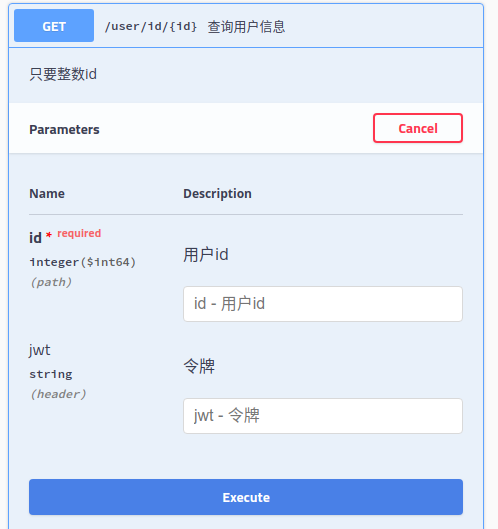
可以进行以下配置,让所有Swagger2中接口都带上token参数(import省略),但是将required设置为false,因为部分接口如登录注册不需要提交jwt头部参数:
1
2
3
4
5
6
7
8
9
10
11
12
13
14
15
16
17
18
19
20
21
22
23
24
25
26
27
28
29
30
31
32
33
| @Configuration
@EnableSwagger2
public class Swagger2Config {
@Bean
public Docket createRestApi() {
ParameterBuilder tokenPar = new ParameterBuilder();
List<Parameter> pars = new ArrayList<>();
tokenPar
.name("jwt")
.description("令牌")
.modelRef(new ModelRef("string"))
.parameterType("header")
.required(false)
.defaultValue("默认值,可以写入以方便前端测试")
.build();
pars.add(tokenPar.build());
return new Docket(DocumentationType.SWAGGER_2)
.globalOperationParameters(pars)
.apiInfo(apiInfo())
.select()
.apis(RequestHandlerSelectors.basePackage("com.looyeagee.clbb"))
.paths(PathSelectors.any()).build().pathMapping("/");
}
private ApiInfo apiInfo() {
return new ApiInfoBuilder()
.title("长理帮帮restful API")
.description("by looyeagee")
.termsOfServiceUrl("https://looyeagee.cn")
.version("1.0")
.build();
}
}
|
结果
![图2:全局JWT头]()
实体作为参数,但参数列表过长在Swagger2中需隐藏部分参数的问题
问题
注册接口和登录接口都要用到这个如下实体类,但是Swagger2不好怎么配置使登录接口只展示2个参数。
1
2
3
4
5
6
7
8
9
10
11
12
13
14
15
16
17
18
19
20
21
22
23
24
25
26
27
28
29
30
| @Data
@JsonInclude(JsonInclude.Include.NON_NULL)
public class User implements Serializable {
public interface LoginGroup {}
@TableId
@JsonSerialize(using = ToStringSerializer.class)
@ApiModelProperty(value = "用户id", hidden = true)
private Long id;
@ApiModelProperty(value = "用户名", required = true)
@NotBlank(message = "用户名不能为空",groups = {LoginGroup.class, Default.class})
@Size(min = 5, max = 16, message = "用户名长度必须为5-16个字符")
private String userName;
@NotBlank(message = "密码不能为空",groups = {LoginGroup.class, Default.class})
@Pattern(regexp = "^(?=.*[0-9])(?=.*[a-zA-Z])(?=.*[!@#$_&*+-])[0-9a-zA-Z!@#$_&*+-]{6,16}$", message = "用户密码需要至少包含一个数字,一个字母,一个特殊字符且长度在6~16之间")
@ApiModelProperty(value = "用户密码", required = true)
private String password;
@NotBlank(message = "手机不能为空")
@Pattern(regexp = "^1[3456789]\\d{9}$",message = "输入的手机号码不符合规范")
@ApiModelProperty(value = "手机号码", required = true)
private String phoneNumber;
}
|
解决
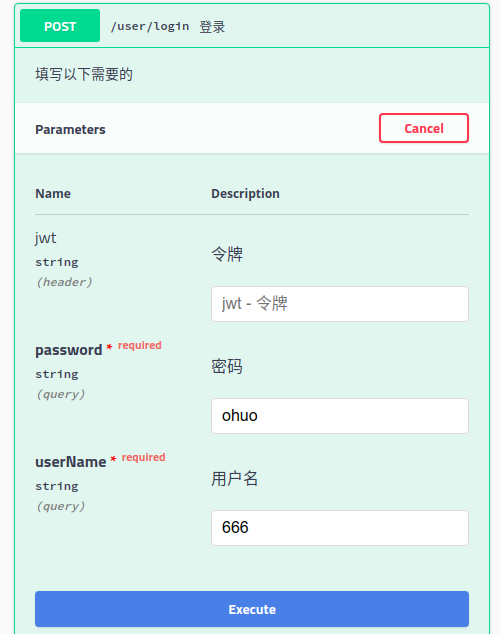
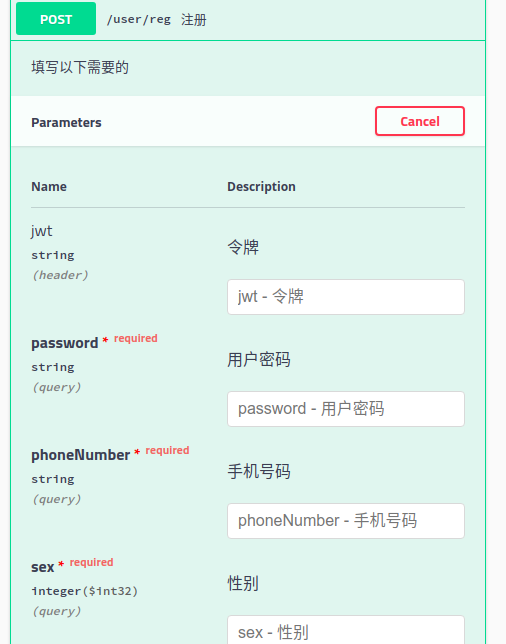
现在注册接口和登录接口都要用到这个实体类,考虑到注册接口参数多一些所以直接在上述类中写好Swagger2中的配置,但是登录接口只要实体类中的用户名和密码这两个参数,所以不应该展示过多的参数,这时应该这样做,将登录、注册接口如下定义(import省略),Swagger2用@ApiIgnore注解忽略登录接口中的User参数,然后手动用@ApiImplicitParams和@ApiImplicitParam注解配置参数信息,具体参考下方代码。此外,SpringBoot还是得进行用户名和密码不能为null或空的参数检验,这时候为了区分注册接口要用的校验,就得使用到分组检验(可参考上面的实体类定义的检验注解,先定义一个分组接口,然后在需要校验的注解上加上groups = {LoginGroup.class, Default.class}这个参数即可,其中LoginGroup为分组接口名,然后再在控制类参数前加上@Validated(value = User.LoginGroup.class)注解即可):
1
2
3
4
5
6
7
8
9
10
11
12
13
14
15
16
17
18
19
20
21
22
23
24
25
26
27
28
29
30
31
32
33
34
35
| @Validated
@RestController
@RequestMapping(value = "/user")
@Api(description = "用户登录注册查询")
public class UserController {
@Autowired
UserServiceImpl userService;
@ApiOperation(value = "登录", notes = "填写以下需要的")
@ApiImplicitParams({
@ApiImplicitParam(paramType = "query", name = "userName", value = "用户名", dataType = "String", example = "ohuo", required = true),
@ApiImplicitParam(paramType = "query", name = "password", value = "密码", dataType = "String", example = "666", required = true)}
)
@PostMapping(value = "/login")
public ResultModel login(@ApiIgnore @Validated(value = User.LoginGroup.class) User user) {
User loginUser = userService.login(user);
if (loginUser == null) {
return new ResultFailure("登录失败,请检查帐号密码是否错误");
} else {
return new ResultSuccess("登录成功,欢迎您" + loginUser.getUserName(), userService.createJWTResultMap(loginUser));
}
}
@ApiOperation(value = "注册", notes = "填写以下需要的")
@PostMapping(value = "/reg")
public ResultModel reg(@Validated User user) {
if (userService.addUser(user)) {
return new ResultSuccess("注册成功");
} else {
return new ResultFailure("存在重复用户名或手机号码!");
}
}
}
|
结果
登录:
![图3:登录]()
![图4:注册]()
参数为Date,前端不知道传啥格式
重现
传日期进去不正确就会抛出java.lang.IllegalArgumentException异常
解决
按如下格式传入即可(0可以不补)
2019/11/17 23:05:55